AI can create significant value for organisations of every size by improving productivity, decision-making and the way employees work. However, gaining real business value from AI requires more than simply purchasing licences or enabling new tools, and increased AI usage can also introduce additional security and governance risks. CISO Online’s Secure AI Adoption service helps organisations roll out Microsoft Copilot and AI capabilities in a structured, secure and cost-effective way, focusing on practical business value, responsible use and proportionate security controls. The result is faster, safer and more effective AI adoption without unnecessary complexity or investment.
The Copilot Packages are delivered through a structured two-phase approach to ensure both effective implementation and sustained value.
Your SECURE AI ADOPTION journey
Phase 1:
Copilot Rollout
One-Time
THE INITIAL PHASE ESTABLISHES A SECURE
AI FOUNDATION, DEPLOYS THE RIGHT AI
CAPABILITIES, AND PREPARES YOUR PEOPLE
FOR EFFECTIVE ADOPTION WITHOUT
COMPROMISING SECURITY.
Phase 2:
Copilot Operation
Ongoing
ONGOING COPILOT OPERATIONS
TO MAINTAIN, SECURE, MONITOR, AND
CONTINUOUSLY OPTIMISE AI ADOPTION AND
BUSINESS VALUE
The rollout phase establishes a secure and scalable foundation for AI adoption. It
includes assessing organisational readiness, preparing security and governance
controls, deploying and configuring Microsoft Copilot and applicable AI
capabilities, and enabling users through structured training and adoption support.
Depending on the selected service package, this phase may also include
Microsoft-built agents, custom AI agents, Copilot skills, and AI-driven automation.
The objective is to introduce AI effectively while protecting organisational data,
reducing risk, and accelerating productivity and time to value.
Microsoft 365 Copilot (Premium/Enterprise) rollout
Copilot Chat enablement across M365
Copilot for Office 365 Apps enablement (Word, Excel, Teams, SharePoint, Out Look,
Power Point, OneDrive, OneNote, Planner, Forms, Loop, Whiteboard)
Copilot Security Foundation
Access Review: Entra and SharePoint / OneDrive / Teams Oversharing Check
Agent Sharing and Approval Governance, Agent Access Control
Copilot safe usage Training
Copilot Agents – Microsoft Prebuilt (Rollout + Training)
Deployment of 9 Microsoft-built agents: Researcher, Analyst, Prompt Coach, Planner, Learning Coach, Writing Coach, Idea Coach, Learning, Surveys
Users Training & Adoption
Phase 2: Copilot Operation (Ongoing Services)
The ongoing operation phase ensures that AI continues to deliver secure, reliable,
and measurable value over time. It includes ongoing support, adoption and usage
monitoring, maintenance and optimisation of applicable Copilot capabilities,
agents and automation, security and governance reviews, user enablement, and
regular advisory services. The objective is to continuously improve AI adoption
and productivity, identify new opportunities, manage evolving risks, and keep AI
capabilities aligned with changing business needs and objectives.
Explore our Cyber Premium Package to find the right fit for your organisation
AI ADOPTION Copilot Rollout
AI Foundation
The AI Foundation is designed to ensure that Copilot adoption is aligned with the organisation’s existing Microsoft 3employee5 environment, business priorities, user needs, security posture, and data governance practices. It creates a structured starting point for adoption while identifying opportunities for future AI agents, automation, and measurable productivity improvement.
This step includes:
The AI Foundation establishes the essential organisational, technical, and user foundation required for effective Microsoft Copilot adoption. It prepares the organisation for Microsoft 365 Copilot by assessing readiness, validating licensing and tenant requirements, identifying priority users and business use cases, configuring the Copilot environment, and enabling employees to use Copilot Chat and Copilot capabilities across Microsoft 365 applications effectively and responsibly.
AI readiness assessment and Access Review
Microsoft 365 Copilot (Premium/Enterprise) rollout
Copilot Chat enablement across M365
Copilot for Office 365 Apps enablement (Word, Excel, Teams, SharePoint, Out Look, Power Point, OneDrive, OneNote, Planner, Forms, Loop, Whiteboard)
AI readiness assessment
The AI Readiness Assessment evaluates the organisation’s preparedness for Microsoft 365 Copilot and identifies the priority actions, users and business areas for adoption.
Included Scope
Review Microsoft 365 licensing, Copilot eligibility and tenant readiness.
Identify suitable pilot users, priority departments and adoption groups.
Assess security: access, information-sharing and data-governance readiness.
High-level review departmental workflows and high-value Copilot use cases.
Identify future AI agent and workflow-automation opportunities.
Client Outcome
A prioritised readiness assessment that identifies where to begin, which users and use cases to prioritise, and what technical, security or organisational actions should be addressed before rollout.
Microsoft 365 Copilot (Premium / Enterprise) Rolout
The Microsoft 365 Copilot Rollout provides a structured and controlled approach and deployment activities to configuring, launching and supporting Copilot across the organisation.
Included Scope
Validate Copilot licence assignments and user eligibility.
Review relevant Microsoft 365 administration and Copilot settings.
Complete deployment and go-live readiness checks.
Prepare user communications and rollout guidance.
Establish user feedback and issue-reporting channels.
Define the initial Copilot support and escalation process.
Client Outcome
A securely configured and supportable Copilot environment, introduced through a coordinated rollout with clear communications, ownership and support arrangements.
Microsoft 365 Copilot Chat
Copilot Chat Enablement prepares employees to use AI safely and productively for everyday activities such as research, summarisation, drafting, idea development and information organisation.
Included Scope
Practical Copilot Chat productivity scenarios.
Guidance on web-grounded and work-grounded AI experiences.
Data-protection and responsible-use principles.
Safe, restricted and high-risk prompt guidance.
Prompt-writing fundamentals for clearer and more reliable outputs.
User FAQs, acceptable-use guidance and support information.
Client Outcome
Employees understand how to use Copilot Chat effectively, recognise its limitations, protect organisational information and review AI-generated content appropriately.
Copilot for Microsoft 365 Apps Enablement
This service helps employees apply Copilot within the Microsoft 365 applications they already use, connecting AI capabilities with real business activities and role-specific responsibilities.
Application Coverage:
Content and communication: Word, Outlook and PowerPoint for drafting, rewriting, summarising, email management and presentation development.
Data and information collection: Excel and Forms for data exploration, trend identification, analysis and survey preparation.
Meetings and collaboration: Teams, Loop and Whiteboard for meeting summaries, action items, shared content, brainstorming and collaborative planning.
Knowledge and file management: SharePoint, OneDrive and OneNote for finding, understanding, comparing and organising accessible business information.
Planning and execution: Planner for task planning, prioritisation, work organisation and next step identification.
Training includes practical scenarios for relevant business functions such as sales, HR, finance, operations, IT and management. Client Outcome
Employees can integrate Copilot into their existing work, reducing manual effort, improving access to information and accelerating the preparation of documents, analysis, communications, meetings and plans.
Copilot Security Foundation
The Security Foundation establishes the essential security controls for Microsoft Copilot and Microsoft-built agents while addressing priority information-access and oversharing risks.
Included Scope
Review priority identity, access and Microsoft 365 information-sharing risks.
Remediate agreed high-risk access, oversharing and external-sharing findings.
Apply appropriate access controls to priority SharePoint and OneDrive information sources.
Apply targeted Microsoft Purview DLP safeguards for selected high-risk Copilot prompt scenarios, subject to licensing and availability.
Establish safe-use and acceptable-use guidance.
Client Outcome
A clear security baseline that helps the organisation address the most important access, information-sharing and governance risks before expanding Copilot adoption.
Copilot Agents - Microsoft Prebuilt (Rolout + Training) Rolout of 9 Microsoft-built agents
This service enables organisations to introduce Microsoft-built Copilot agents that support specialised workplace activities beyond general Copilot use. The selected agents help employees research complex topics, analyse business information, improve prompts and writing, organise work, develop ideas, support learning and create surveys or feedback activities. The available agent set includes Researcher, Analyst, Prompt Coach, Planner, Learning Coach, Writing Coach, Idea Coach, Learning and Surveys. Together, these agents can help employees work more efficiently, improve the quality of business outputs and access specialised AI support for common knowledge-work activities. Deployment covers up to nine Microsoft-built agents, subject to Microsoft licensing, tenant configuration, regional availability and ongoing product availability.
Included Scope
Confirm agent availability and select the most relevant agents for the organisation.
Align each agent with suitable departments, users and business scenarios.
Configure approved access, visibility and ownership.
Deliver practical role-based training and usage guidance.
Validate access and expected behaviour.
Client Outcome
Employees gain access to specialised Microsoft AI capabilities that support research, analysis, planning, writing, learning and collaboration. The organisation benefits from a controlled rollout, clearer user adoption and improved productivity without needing to design and build these agents from the ground up.
Advanced User Training & Adoption
The Advanced User Training & Adoption service prepares employees and relevant business stakeholders to use Microsoft 365 Copilot and the AI capabilities deployed under their selected package safely, effectively and responsibly.
CISO Online provides focused, role-based training aligned with the organisation’s enabled Copilot applications, Microsoft-built agents, and custom agents. Training is limited to the capabilities included in the customer’s package and configured within their Microsoft 365 environment.
The service focuses on practical workplace use, safe information handling, human review and clear ownership. It is designed to provide users with the essential skills required for adoption without creating an extensive or costly enterprise learning programme.
Client Outcome
Employees gain the confidence and practical skills required to use approved AI capabilities effectively, while managers and owners understand how to support adoption, maintain oversight and focus AI use on valuable business outcomes.
AI ADOPTION Copilot Operation
AI Foundation Maintenance
The AI Foundation Maintenance service provides essential oversight of the Microsoft 365 Copilot environment. It helps the organisation maintain reliable access, manage licences effectively and respond to important Microsoft service changes.
Included Scope
Review Copilot availability, licences and material access changes.
Identify inactive or underused licences and reallocation opportunities.
Review high-level adoption, user feedback and operational issues.
Highlight important Microsoft updates requiring customer action.
Provide minor configuration guidance and prioritised recommendations.
Client Outcome
A stable and supportable Copilot environment with improved visibility over licence value, adoption, operational issues and required improvements.
Microsoft Agent Ongoing Maintenance
This service keeps enabled Microsoft-built agents aligned with current business needs, user demand and Microsoft product availability.
Included Scope
Review new, changed, restricted or retired Microsoft agents.
Review approved access, visibility and high-level usage.
Identify material adoption, access or user-understanding issues.
Recommend enabling, piloting, restricting or retiring agents.
Record priority actions and targeted training needs.
Client Outcome
The organisation continues to provide relevant Microsoft agents to the right users while avoiding unnecessary, outdated or low-value capabilities.
GET READY FOR MICROSOFT COPILOT
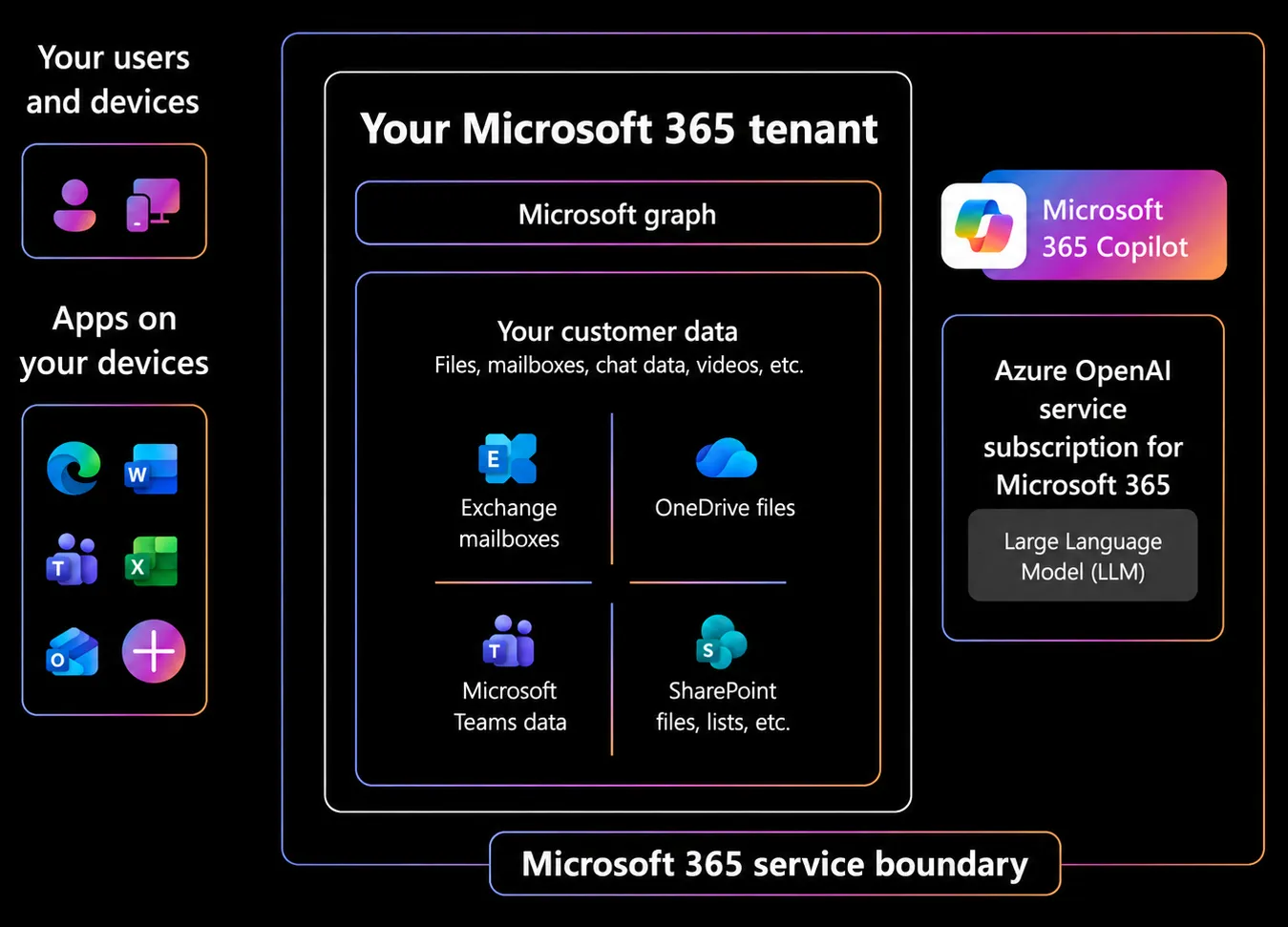
Microsoft 365 Copilot is an AI-powered productivity tool that uses large language models (LLMs) and integrates your data with the Microsoft Graph and Microsoft 365 Apps. It brings AI into the tools employees already use, helping them work faster, reduce repetitive effort and improve everyday productivity. Copilot Chat and Microsoft-built agents support activities such as research, analysis, writing, planning and information discovery, while custom agents can provide organisation-specific support using approved business knowledge. For more advanced adoption, AI-driven employee automation can streamline recurring, multi-step work such as reporting, planning, project coordination and communication, creating a practical path from everyday AI assistance to higher-value automation.
Our cyber security team is made up of highly skilled professionals, all certified by leading companies like Microsoft, CISCO, F5, Juniper, and IQS. They stay up to date with the latest industry standards and technologies to ensure your business is protected against the ever-evolving threats in the digital world. With our team on your side, you can trust that your cyber security is in expert hands.
our trusted partners
We are backed by leading security vendors and reputable associations to strengthen your cyber security. Our team of experts shares their knowledge and experience to provide you with the best solutions.